Mastering Smart Home Automation: Build 5 Custom Scenes in Under 1 Hour (PRACTICAL SOLUTIONS)
Anuncios
In today’s fast-paced world, our homes are no longer just places to live; they are evolving into intelligent ecosystems designed to enhance our comfort, security, and efficiency. The cornerstone of this evolution is smart home automation. Imagine a home that anticipates your needs, adjusts to your presence, and manages its resources intelligently. This isn’t science fiction; it’s the reality that smart home automation offers. But for many, the idea of setting up complex automation can seem daunting. Fear not! This comprehensive guide will demystify the process, showing you how to build five powerful custom smart home scenes in under an hour, providing practical solutions that anyone can implement.
Anuncios
Whether you’re a seasoned tech enthusiast or a complete beginner, mastering smart home automation scenes is the key to unlocking the full potential of your smart devices. These scenes, often referred to as routines or automations, are essentially a series of actions triggered by a single command, schedule, or event. They allow your smart devices to work together seamlessly, creating a truly integrated and intuitive living environment. From greeting you in the morning to securing your home at night, custom scenes can transform your daily routines, making life simpler, safer, and more enjoyable.
Before we dive into building these scenes, it’s important to understand the fundamental principles behind smart home automation. At its core, it’s about connectivity and interoperability. Your smart devices – lights, thermostats, locks, security cameras, speakers, and more – communicate with each other and with a central hub or app. This communication allows you to create conditional triggers and actions. For instance, ‘IF’ motion is detected ‘THEN’ turn on the lights. Or ‘IF’ it’s 7 AM ‘THEN’ start the coffee maker and open the blinds. The possibilities are virtually endless, limited only by your imagination and the compatibility of your devices.
The beauty of smart home automation lies in its ability to adapt to your lifestyle. No two homes or inhabitants are exactly alike, which is why pre-set automations often fall short. Custom scenes empower you to tailor your home’s behavior precisely to your preferences. This guide will walk you through five distinct and highly useful scenes, each designed to address common household needs and significantly improve your daily living experience. We’ll focus on practical applications that deliver immediate benefits, demonstrating just how accessible and impactful smart home automation can be.
Anuncios
So, get ready to take control of your home like never before. With a little guidance and a few smart devices, you’ll be amazed at how quickly you can create a more responsive, efficient, and intelligent living space. Let’s embark on this journey to master smart home automation and build a smarter home, one scene at a time.
Understanding the Basics of Smart Home Automation Scenes
Before we start building, let’s clarify what a ‘scene’ or ‘routine’ in smart home automation entails. Essentially, it’s a programmed sequence of actions executed by multiple smart devices, triggered by a specific event, time, or voice command. Think of it as a mini-orchestra where your smart devices are the instruments, and the scene is the conductor, ensuring they play in harmony.
Key Components of a Smart Home Scene:
- Trigger: This is what initiates the scene. It could be a specific time (e.g., 7:00 AM), an event (e.g., motion detected, door opened), a device state (e.g., thermostat reaches 72°F), or a manual command (e.g., pressing a smart button, saying ‘Good Morning’ to a smart speaker).
- Actions: These are the tasks your smart devices perform once the trigger is activated. Examples include turning lights on/off, adjusting brightness/color, changing thermostat temperature, locking/unlocking doors, playing music, opening blinds, or sending notifications.
- Conditions (Optional): Some scenes allow for conditions that must be met for the actions to execute. For example, ‘IF’ motion is detected ‘AND’ it’s dark outside ‘THEN’ turn on hallway lights.
Choosing Your Smart Home Ecosystem:
The first step in effective smart home automation is often choosing an ecosystem. Popular choices include:
- Amazon Alexa: Integrates with a vast array of devices and offers robust voice control.
- Google Home/Assistant: Similar to Alexa, with strong integration with Google services and Android devices.
- Apple HomeKit: Known for its strong security and privacy features, primarily for Apple users.
- Samsung SmartThings: A versatile hub-based system that supports many different communication protocols (Zigbee, Z-Wave, Wi-Fi).
- Tuya/Smart Life: A popular platform for many affordable Wi-Fi smart devices.
While some devices are cross-compatible, sticking to one primary ecosystem or using a universal hub can simplify the setup and management of your smart home automation scenes. For this guide, we’ll focus on principles applicable across most platforms.
Essential Smart Devices for Automation:
To create the scenes we’ll discuss, you’ll ideally have some of the following:
- Smart Lights: Bulbs or switches (e.g., Philips Hue, Lutron Caseta, TP-Link Kasa).
- Smart Plugs: To make ‘dumb’ appliances smart (e.g., TP-Link Kasa, Wemo).
- Smart Thermostat: For climate control (e.g., Nest, Ecobee, Honeywell Home).
- Smart Locks: For enhanced security (e.g., August, Yale, Schlage Encode).
- Motion Sensors/Door/Window Sensors: For triggers and security.
- Smart Speaker/Display: For voice control and notifications (e.g., Amazon Echo, Google Nest Hub).
- Smart Blinds/Curtains: For light and privacy control.
Don’t worry if you don’t have all of these! You can start small and expand your smart home automation setup over time. The key is to understand how these devices can interact to create a cohesive and intelligent home.
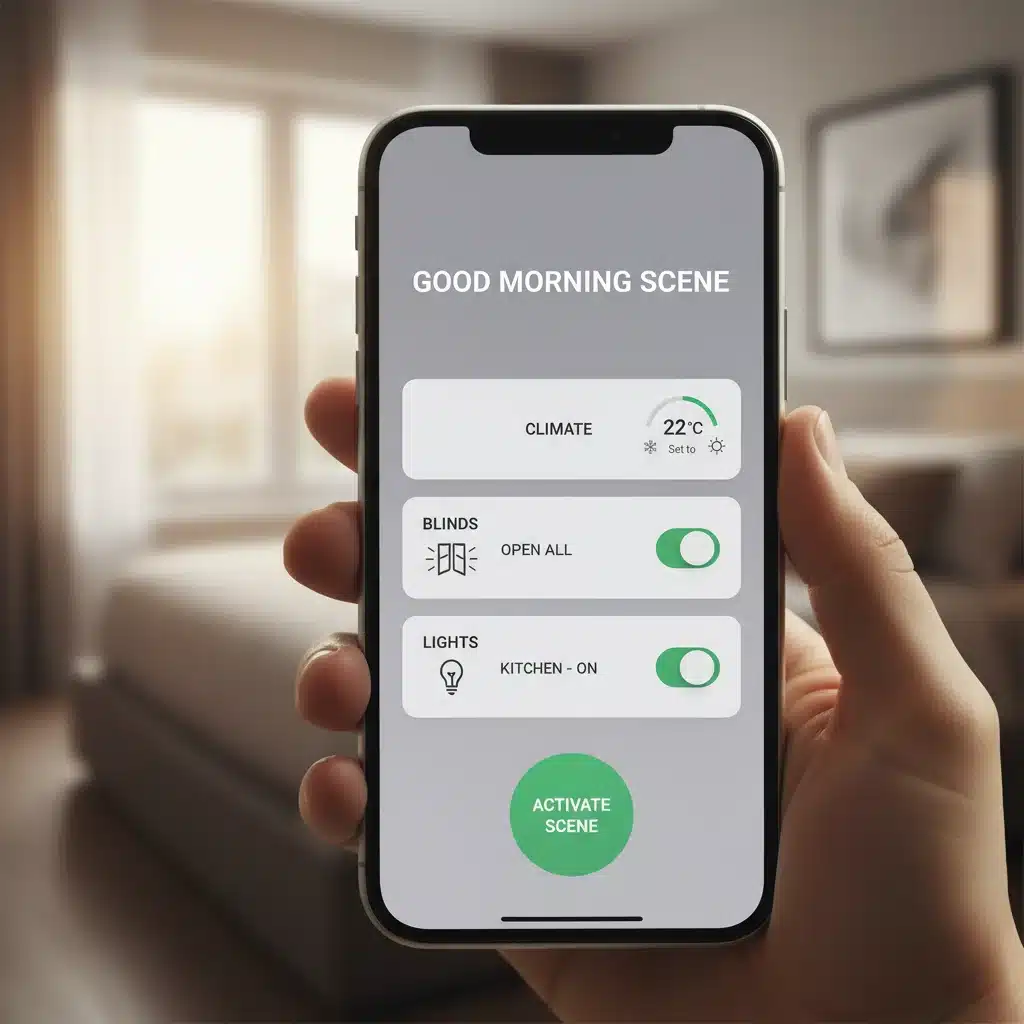
Scene 1: The ‘Good Morning’ Wake-Up Routine (10 Minutes)
Start your day gently and efficiently with a custom ‘Good Morning’ scene. This scene aims to gradually bring your home to life, helping you wake up naturally and smoothly.
Devices Needed:
- Smart Lights (bedroom, kitchen)
- Smart Thermostat
- Smart Speaker (optional, for music/news)
- Smart Blinds/Curtains (optional)
How to Build It (General Steps):
- Open your smart home app: Navigate to the ‘Routines’, ‘Scenes’, or ‘Automations’ section.
- Create a new scene: Name it ‘Good Morning’.
- Set the Trigger: Choose a specific time, e.g., 7:00 AM on weekdays. Some platforms allow for ‘sunrise’ as a trigger, which is even better for natural waking.
- Add Actions:
- Lights: Set bedroom lights to turn on at 1% brightness, gradually increasing to 50% over 15 minutes. Set kitchen lights to turn on at 75% brightness.
- Thermostat: Adjust the thermostat to your preferred morning temperature (e.g., 72°F).
- Smart Speaker (Optional): Play a gentle alarm sound, a specific playlist (e.g., ‘Morning Jazz’), or a news briefing.
- Smart Blinds (Optional): Open blinds to a desired percentage.
- Save and Test: Save the scene and manually activate it once to ensure all actions perform as expected.
Why it’s effective for smart home automation:
This scene leverages gradual changes to ease you into the day, promoting a more pleasant wake-up experience than a jarring alarm clock. It also preps your living space for your arrival, ensuring comfort and convenience from the moment you step out of bed. It’s a prime example of how smart home automation enhances daily comfort.
Scene 2: The ‘Leaving Home’ Security & Energy Saver (15 Minutes)
Ensure your home is secure and energy-efficient every time you leave with this essential scene. It’s about peace of mind and saving money.
Devices Needed:
- Smart Locks
- Smart Lights
- Smart Thermostat
- Smart Plugs (for non-essential appliances)
- Motion Sensors/Door Sensors (optional, for trigger)
How to Build It (General Steps):
- Open your smart home app: Go to the ‘Routines’ or ‘Scenes’ section.
- Create a new scene: Name it ‘Leaving Home’.
- Set the Trigger: This can be a voice command (e.g., ‘Alexa, I’m leaving’), pressing a smart button near the door, or a geofence (when your phone leaves a defined area around your home). A door sensor on your main exit can also trigger it.
- Add Actions:
- Smart Locks: Lock all smart doors.
- Lights: Turn off all smart lights in the house.
- Thermostat: Adjust the thermostat to an energy-saving temperature (e.g., 78°F in summer, 65°F in winter).
- Smart Plugs: Turn off smart plugs connected to non-essential devices like desk lamps, entertainment systems (if not needed for security), or chargers.
- Security System (Optional): Arm your smart home security system.
- Save and Test: Activate the scene and verify that all devices respond correctly.
Why it’s effective for smart home automation:
This scene provides instant security and energy savings with a single command or action. No more wondering if you left a light on or if the door is unlocked. It exemplifies how smart home automation integrates security and efficiency seamlessly into your daily routine.
Scene 3: The ‘Movie Night’ Ambiance Creator (10 Minutes)
Transform your living room into the perfect cinematic experience with a ‘Movie Night’ scene. Get the lighting, sound, and comfort just right with a single command.
Devices Needed:
- Smart Lights (living room, especially color-changing bulbs)
- Smart TV (or smart plug for TV)
- Smart Speaker/Soundbar
- Smart Blinds/Curtains (optional)
How to Build It (General Steps):
- Open your smart home app: Access the scenes or routines section.
- Create a new scene: Call it ‘Movie Night’.
- Set the Trigger: A voice command (e.g., ‘Hey Google, Movie Night’), a smart button press, or via your smart home app.
- Add Actions:
- Lights: Dim living room lights to 10-20% brightness and change color to a warm, inviting hue (e.g., deep blue, amber, or purple). Turn off any other unnecessary lights in the room.
- Smart TV (Optional): Turn on your smart TV. Some advanced integrations allow you to even launch a specific streaming app.
- Smart Speaker/Soundbar (Optional): Set volume to a preferred level or switch audio output to a soundbar.
- Smart Blinds (Optional): Close smart blinds/curtains.
- Save and Test: Run the scene to ensure your living room transforms into a cozy cinema.
Why it’s effective for smart home automation:
This scene is all about creating an immersive atmosphere effortlessly. Instead of manually adjusting multiple devices, one command sets the perfect mood, showcasing the convenience and luxury that smart home automation can bring to entertainment.
Scene 4: The ‘Welcome Home’ Comfort Settler (10 Minutes)
Arrive to a welcoming and comfortable home every time. This scene ensures your environment is just right as you walk through the door.
Devices Needed:
- Smart Lights (entryway, living room)
- Smart Thermostat
- Smart Speaker (optional, for music)
- Geofencing (via phone location) or Door Sensor
How to Build It (General Steps):
- Open your smart home app: Go to the ‘Routines’ or ‘Scenes’ section.
- Create a new scene: Name it ‘Welcome Home’.
- Set the Trigger: The most common trigger is geofencing – when your smartphone enters a defined area around your home. Alternatively, a door sensor on your main entry door can trigger it.
- Add Actions:
- Lights: Turn on entryway and living room lights to a comfortable brightness (e.g., 50-75%).
- Thermostat: Adjust the thermostat to your preferred ‘home’ temperature.
- Smart Speaker (Optional): Play your favorite ‘Welcome Home’ playlist or a podcast.
- Smart Lock (Optional): Unlock the door (use with caution and ensure security protocols are robust).
- Save and Test: Test by leaving and re-entering your geofence, or by manually triggering it.
Why it’s effective for smart home automation:
This scene eliminates the need to fumble with switches or adjust settings upon arrival. Your home intelligently prepares for your presence, offering immediate comfort and convenience. It’s a powerful demonstration of how smart home automation can proactively improve your living experience.
Scene 5: The ‘Good Night’ Security & Sleep Prep (15 Minutes)
Wind down and secure your home for the night with a single command. This scene ensures everything is powered down, locked up, and ready for a peaceful sleep.
Devices Needed:
- Smart Lights (all rooms, especially bedrooms)
- Smart Locks
- Smart Thermostat
- Smart Plugs (for non-essential appliances)
- Smart Security System (optional)
- Smart Blinds/Curtains (optional)
How to Build It (General Steps):
- Open your smart home app: Navigate to ‘Routines’ or ‘Scenes’.
- Create a new scene: Name it ‘Good Night’.
- Set the Trigger: A voice command (e.g., ‘Hey Siri, Good Night’), pressing a smart button on your nightstand, or a specific time (e.g., 10:30 PM).
- Add Actions:
- Lights: Turn off all lights in the house, except perhaps a dim nightlight in a hallway or bathroom. Bedroom lights can dim slowly over a few minutes.
- Smart Locks: Ensure all smart doors are locked.
- Thermostat: Adjust the thermostat to your preferred sleeping temperature.
- Smart Plugs: Turn off smart plugs connected to non-essential devices (e.g., TV, gaming console).
- Smart Security (Optional): Arm your security system to ‘Stay’ or ‘Night’ mode.
- Smart Blinds (Optional): Close all smart blinds/curtains.
- Save and Test: Activate the scene and confirm all devices respond as intended.
Why it’s effective for smart home automation:
This scene streamlines your bedtime routine, ensuring your home is secure and optimized for sleep without manual checks. It’s a comprehensive approach to end your day, bringing convenience, security, and energy efficiency together through smart home automation.
Optimizing Your Smart Home Automation for Maximum Impact
Building these five scenes is just the beginning of your journey into advanced smart home automation. To truly master it, consider these optimization tips:
1. Device Compatibility and Integration:
Always check device compatibility before purchasing. While many devices claim to be ‘smart,’ their ability to integrate seamlessly into your chosen ecosystem is crucial for effective smart home automation. Look for devices that support the same communication protocols (Wi-Fi, Zigbee, Z-Wave, Bluetooth) and are certified by your platform (Works with Alexa, Google Assistant, HomeKit compatible). A universal hub like SmartThings or Home Assistant can bridge gaps between different protocols, offering greater flexibility.
2. Naming Conventions:
Use clear, consistent, and easy-to-remember names for your devices and scenes. This is especially important for voice control. Instead of ‘Living Room Lamp 1,’ try ‘Main Living Room Light.’ For scenes, ‘Good Morning’ is much more intuitive than ‘Morning Routine 1A.’ Good naming practices significantly improve the usability of your smart home automation setup.
3. Testing and Refinement:
After creating each scene, test it multiple times under different conditions. Does the ‘Good Morning’ scene work if you wake up earlier? Does ‘Leaving Home’ trigger reliably with geofencing? Be prepared to tweak timings, brightness levels, and triggers to perfectly match your preferences and home environment. Smart home automation is an iterative process; continuous refinement leads to optimal performance.
4. Consider Dependencies and Delays:
Sometimes, devices need a moment to respond. Adding small delays between actions in a scene (e.g., turn on lights, then wait 5 seconds, then adjust thermostat) can prevent issues and ensure smooth execution, especially with devices on different network types or with varying response times. This attention to detail is key for reliable smart home automation.
5. Security and Privacy:
As you delve deeper into smart home automation, prioritize security and privacy. Use strong, unique passwords for all your smart devices and accounts. Enable two-factor authentication whenever available. Be mindful of the data your devices collect and how it’s used. Regularly update device firmware to patch potential vulnerabilities. A secure smart home is a truly smart home.
6. Expand Gradually:
You don’t need to automate your entire home overnight. Start with one or two rooms or specific pain points you want to address. As you gain confidence and experience, gradually expand your smart home automation to other areas and devices. This phased approach makes the process less overwhelming and more enjoyable.
7. Leverage Advanced Features:
Once you’re comfortable with basic scenes, explore advanced features like conditional logic (‘IF A AND B THEN C’), presence detection (using motion sensors or device activity), and integration with external services (e.g., weather forecasts to adjust heating/cooling). Many platforms offer ‘labs’ or ‘experimental’ features that allow for highly customized and intelligent smart home automation.
8. Backup Your Configurations:
If your smart home platform allows it, regularly back up your scene and device configurations. This can save you a lot of time and effort if you ever need to reset a device or migrate to new hardware. It’s a small step that can prevent major headaches in your smart home automation journey.
9. Stay Informed:
The world of smart home automation is constantly evolving. New devices, features, and integrations are released regularly. Follow tech blogs, join online communities, and keep an eye on updates from your chosen ecosystem providers to stay informed and discover new ways to enhance your smart home.
Conclusion: Your Smarter Home Awaits
You’ve just learned how to build five impactful smart home automation scenes in under an hour, proving that creating an intelligent living space is far more accessible than many believe. From waking up peacefully to securing your home at night, these practical solutions demonstrate the power and convenience that well-designed automation can bring to your daily life.
The journey to mastering smart home automation is an exciting one. It’s about personalizing your environment, enhancing your comfort, boosting your security, and optimizing your energy consumption. By taking the time to set up these scenes, you’re not just automating tasks; you’re reclaiming precious time, reducing daily stresses, and making your home truly work for you.
Remember, this is just the beginning. As you become more familiar with your smart home ecosystem, you’ll discover countless other ways to integrate devices and create even more sophisticated automations. Don’t be afraid to experiment, iterate, and tailor your scenes to perfectly fit your unique lifestyle. The goal is to create a home that is intuitive, responsive, and a joy to live in.
Embrace the future of living. With these practical steps and a little creativity, your home will transform into a testament to intelligent design and seamless convenience. Start building your smart home scenes today and experience the remarkable difference that thoughtful smart home automation can make.
What custom scenes have you created that have transformed your home? Share your experiences and tips in the comments below!